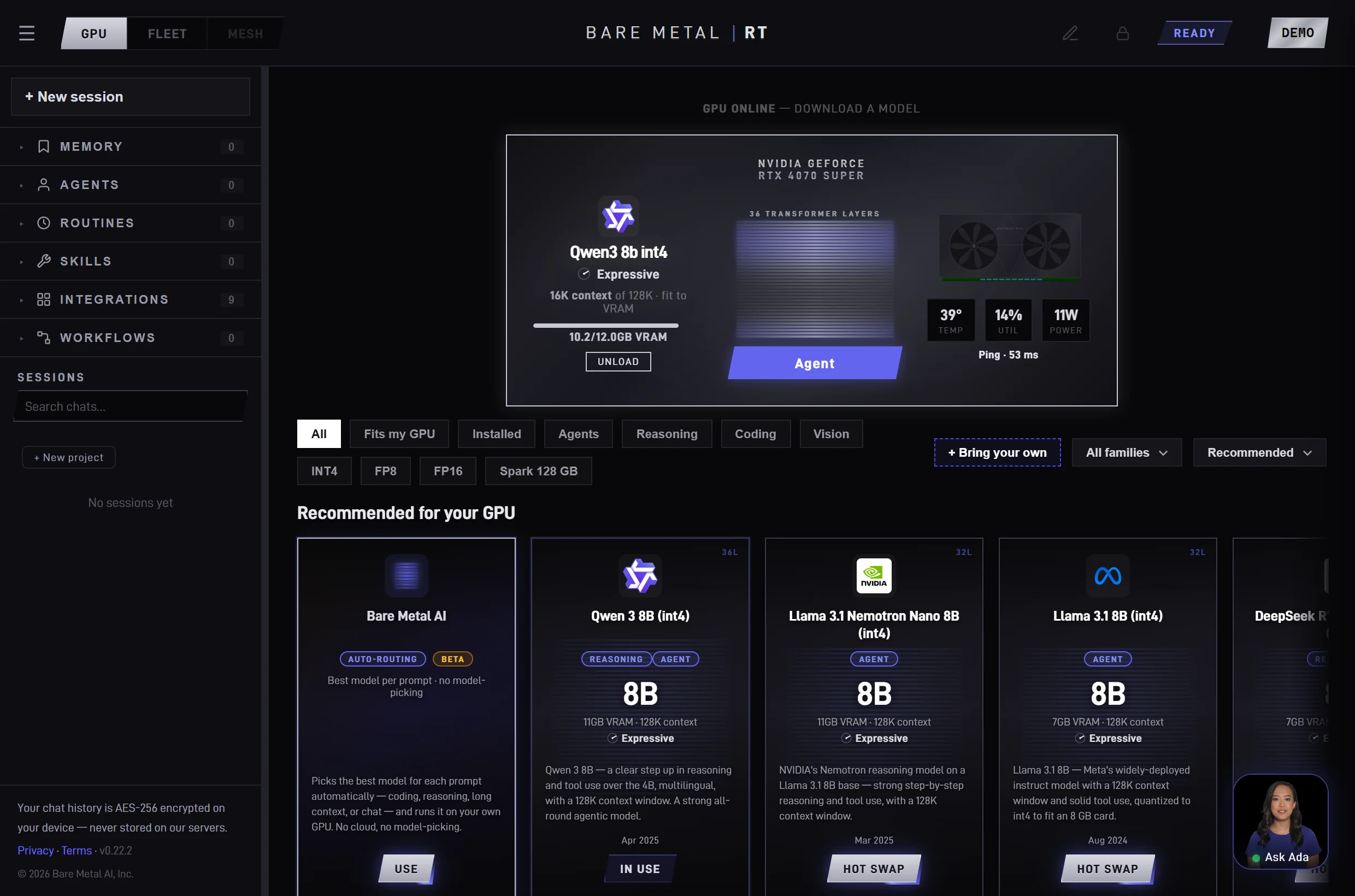
The real app, running live on an RTX GPU — open the model catalog, wire up a tool, or seal the box air-gapped. Open it full screen →
The agent platform · for teams and enterprises
Not just fast. Fully agentic.
BareMetalRT runs agents, not just chats. Bring your own model, plug in 318 integrations, run 29 ready-made skills, and chain them into workflows — all on infrastructure you control. Private by default — from a single team to the whole organization.
Chain your integrations into reusable, schedulable procedures the agent runs for you — each run scoped to just the tools it needs, and remembered so it gets better over time.
In the app — private by default
New · Memory
It remembers what matters — privately
Your agent learns durable facts from your chats, keeps them in a local markdown vault you can audit and edit, and recalls them by meaning when they’re relevant — so a small local model punches above its context window.
In the app — never leaves your machine
Learns & recalls — picks up facts from chat; surfaces the relevant few by meaning
Auditable — review, diff and undo; updates supersede, never delete
Yours & portable — a local Obsidian vault, usable from Claude Code or Cursor
WorkflowMorning ops brief — an agent runs it on your GPU, fully private
1Datadogpull monitors in alert
2ServiceNowcross-ref open incidents
3Your modelsummarize into a brief
4Slackpost to #ops
Scoped to just these toolsEvery run remembered, improves over timeNothing leaves your machine
For teams & enterprise
Connect your stack, govern access, and scale from one GPU to a fleet — without sending data to the cloud.
For individuals
Your inbox, your notes, your files — automated privately on hardware you already own.
Most local AI tools run on llama.cpp — a general-purpose backend built for
portability across any chip. BareMetalRT runs TensorRT-LLM: NVIDIA's production
inference engine, built for RTX hardware, ported natively to Windows for the first time.
1,500+ hand-optimized CUDA kernels
The actual NVIDIA data-center stack
TensorRT-LLM is what AWS, Azure, and Google run to serve frontier models at scale.
It compiles models to your exact RTX card at install time — fused attention kernels,
paged KV-cache, in-flight batching, optimized GEMM, and context windows up to 512K tokens
on a single box for whole codebases and long documents. The same machinery that lets one GPU serve
several people at once — true in-flight batching runs concurrent chats in parallel on the card
instead of one-at-a-time in a queue. How many run at once scales with your GPU's VRAM. No
general-purpose backend. No performance left on the table.
Tensor parallelism across your RTX GPUs
Models too large for one card split across multiple RTX GPUs over ordinary Ethernet —
mix different cards of the same RTX generation, no NVLink, no InfiniBand, no Linux.
We replaced NCCL with a custom network transport. A 14 GB model across a desktop and a
laptop. Working today.
Windows native. OpenAI + Anthropic API.
NVIDIA discontinued TensorRT-LLM on Windows. We maintain the only working
Windows port — no WSL, no Docker, no compatibility layers. Drop-in OpenAI and
Anthropic APIs, so every tool that talks to GPT or Claude can point at your own RTX GPU instead.
Engine
Inference backend
Platform
Data-center engine on Windows
Compiles to your GPU
Concurrent users
Multi-GPU mesh over your network
BareMetalRT
NVIDIA TensorRT-LLM
Windows
Yes
Yes
4–8
Yes
LM Studio
llama.cpp · MLX
Windows · Mac · Linux
No
No
1
No
Ollama
llama.cpp
Windows · Mac · Linux
No
No
~4
No
Jan
llama.cpp
Windows · Mac · Linux
No
No
1
No
GPT4All
llama.cpp
Windows · Mac · Linux
No
No
1
No
Windows ML
ONNX Runtime · DirectML
Windows
No
No
1
No
vLLM
PagedAttention · CUDA
Linux
No
No
many
No
ExLlamaV2 / TabbyAPI
ExLlamaV2
Windows · Linux
No
No
a few
No
Every consumer-facing local engine wraps llama.cpp. BareMetalRT is the only one
running NVIDIA's production data-center engine — and the only one that splits a model
across multiple RTX GPUs over ordinary Ethernet.
The fastest inference backend for Windows. Period.
Menlo Research benchmarked NVIDIA TensorRT-LLM against llama.cpp — the backend every
other consumer tool runs — on the same RTX hardware. TensorRT-LLM won across the board,
and the lead widens as the card gets stronger.
Tokens/sec — higher is faster
70%
Faster on an RTX 4090 — 171 vs 100 tok/s
69%
Faster on a 4090 eGPU over Thunderbolt — 105 vs 62 tok/s
A heterogeneous GPU mesh over commodity Ethernet — from a single workstation to a fleet of PCs across the office. A first on Windows.
We built a ground-up network transport to replace NCCL — tensor parallelism across
mismatched GPUs over a commodity network, no specialized fabric required. At home,
a 4070 in your desktop and a 4060 in your laptop run a single model together; in a
business, the same mesh pools the RTX workstations you already own. Different models,
different VRAM, same RTX generation. No NVLink. No InfiniBand. No Linux.
Rank 0
RTX 4070
Desktop
Online
Network
Rank 1
RTX 4060
Laptop
Online
Networking over commodity Ethernet
NVIDIA's collective library, NCCL, needs an NVLink-class fabric and matched GPUs.
We replaced it with our own transport that runs over the ordinary network you
already have, so GPUs in different machines can work on a single model together.
No NVLink, no InfiniBand, no special switch — just the LAN in your home or office.
Mixed-GPU tensor parallelism
Two different GPU models, two different VRAM sizes, two different machines — same
RTX generation — split a single model across all of them at inference time. NCCL
demands identical cards; we don't. The sharding strategy is computed at session
start from each card's available VRAM, so a 12 GB desktop and an 8 GB laptop each
hold exactly the share they can fit. A model too large for either GPU alone runs
across both — the first time this has worked in a consumer product.
Full-precision results
Splitting a model across mismatched consumer cards can quietly corrupt results if
it's done carelessly. We compute in full precision, so every card stays consistent:
a 4070 and a 4060 working together produce the same answer each would on its own.
No quality penalty for pooling GPUs across machines.
An unoccupied category
Frontier labs — Meta, Mistral, Google DeepMind — target Linux and H100 clusters.
Consumer apps — LM Studio, Ollama, Jan — run llama.cpp on a single GPU. Nobody else
sits at the intersection: NVIDIA's production inference stack, running natively on
consumer Windows, pooling multiple GPUs over a commodity network. Each piece
exists in isolation; the combination is what's new.
Open models downloaded once and run locally — from lightweight instant-response
models to frontier-class reasoning models split across your GPU cluster.
The catalog grows every week as new architectures are validated on-hardware.
Sign in from any device — and the GPU you own answers, whether it sits in
your study or a rack on-prem. The relay is a dumb encrypted pipe: your prompt
reaches your hardware, but the model, the compute, and your conversation history
never leave a machine you control. Private by default, cloud-convenient, $0 per token.
Reach it from anywhere
Sign in at baremetalrt.ai from any device and your GPU responds — no shared WiFi, no VPN, no carrying the hardware with you. Works the same from an office desk or a workstation across the building.
A pipe, not a provider
The relay only forwards TLS-encrypted bytes. Weights, compute, and your chat history — AES-256 encrypted on your own device — stay on hardware you control; no third party ever sees your tokens.
Nothing to expose
No port forwarding, no static IP, no inbound firewall holes. The daemon dials out to the relay, so your network stays closed to the outside.
Headless deployment
Install once. It runs in the background.
Like a Plex server quietly streaming your library to every screen in the house,
BareMetalRT runs as a silent, headless service on your most powerful PC — and every
phone, laptop, and app on your network draws intelligence from it. No window to keep
open, no GUI to babysit. It serves an OpenAI- and Anthropic-compatible API, so existing
tools just work.
# start the inference server — no window, no GUI$ bmrt serve --model qwen3-4b
→ OpenAI-compatible API on http://localhost:1234/v1# point any OpenAI client straight at it$ curl http://localhost:1234/v1/chat/completions \
-d '{"model":"qwen3-4b","messages":[…]}'
# load and list models on demand$ bmrt load deepseek-r1-distill-1.5b
$ bmrt ps
Headless background service
Runs as a daemon with no display attached — autostart on boot, ideal for a dedicated workstation or a shared office PC.
OpenAI + Anthropic API
Drop-in /v1 endpoints on your LAN — OpenAI and Anthropic. Existing SDKs and tools work unchanged; just point them at the new base URL.
Full CLI control
Load, unload, and list models straight from the terminal. Scriptable and automatable for CI, agents, and cron jobs.
For teams and enterprises
Your infrastructure. Your rules.
Cloud AI is fast to start and slow to trust. Other local tools leave RTX performance
on the table because they don't run NVIDIA's production stack. BareMetalRT is the only
option that's both fully private and built on TensorRT-LLM — on the RTX GPU you already own.
Data never leaves your network
Other local AI tools (llama.cpp)
— General-purpose backend (llama.cpp) — built for portability, not NVIDIA's production engine
— No tensor parallelism across machines — a model must fit within one PC
— Generic prebuilt kernels — no compile-to-your-exact-GPU step
— No in-flight batching — serves one chat at a time, not your whole team
BareMetalRT (TensorRT-LLM)
+ NVIDIA's own production inference engine — compiled for your exact RTX card
+ Tensor parallelism across multiple RTX GPUs over your network — run models too big for one card
+ Windows-first, Windows-native — no WSL, no compatibility layer, no Linux box
+ Paged KV-cache, fused kernels, multi-user concurrency — the full data-center stack
From one GPU to a thousand
Built for your fleet. Runs on a single card.
Serve your whole organization across a GPU fleet — or start with one team on a single
workstation. Same engine, same privacy at every scale: no per-seat token metering,
no data leaving your network.
One GPU → an entire fleet
Private by design
Every token runs on hardware you control; nothing leaves your network. Chat history is
AES-256 encrypted on your device, credentials encrypted at rest, traffic TLS in transit.
Your chats stay yours at home — and because there are no third-party subprocessors and it
runs fully air-gapped, the architecture fits the requirements behind HIPAA and SOC 2 environments.
OpenAI + Anthropic compatible
Drop-in /v1 endpoints for both the OpenAI and Anthropic APIs — point
anything that speaks GPT or Claude at your own GPU, a personal script or your team's
whole stack. No SDK changes, no prompt migration.
Scales as you add GPUs
Start on one card. Add a second PC and split a larger model across them over your network.
Add a fleet and serve your whole organization — same engine from a gaming PC to a rack.
Per seat. Unlimited usage. Private.
A flat price per seat — no token meter, run it as hard as you like. Start free at home,
bring your team for $20 a seat (each seat shares with up to 4), and scale to the enterprise
with SSO and support. The engine runs entirely on hardware you own; nothing leaves your network.
See plans & pricing →